Chapter 1 · 1.2
The boot and storage stack
Section 1.1 showed the finished system from above. This section takes it apart into layers, because one idea makes most of this chapter predictable: each layer sees only the layer beneath it, and offers something simpler to the layer above. The SSD offers numbered blocks. The partition table divides them into ranges. The encryption layer turns an unreadable range into a readable one. The filesystem turns that into files and directories. No layer needs to know what the others are doing, and most of the decisions in this chapter follow from what each layer can and cannot see.
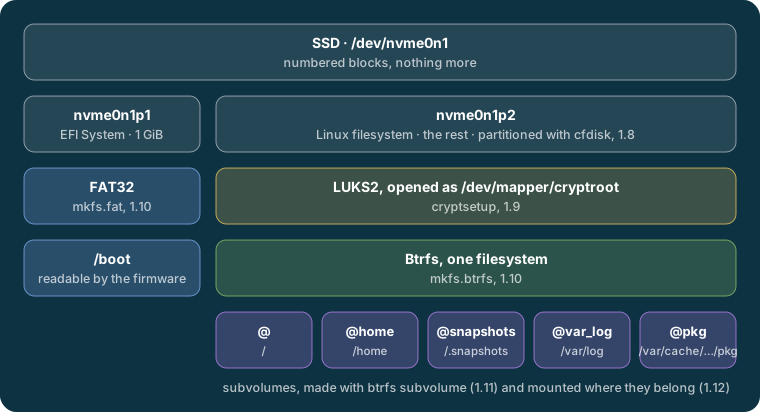
The firmware #
The firmware is the program stored on the motherboard, the first thing that runs when the power button is pressed. On this laptop it is UEFI firmware, the modern replacement for the old PC BIOS. It checks and starts the hardware, then reads a list of boot entries kept in its own memory, the NVRAM, and starts the program the first entry points to.
What matters here is how little it understands. The UEFI standard requires firmware to read a GPT partition table and a FAT filesystem, and that is all most firmware reads: certainly not LUKS, and not Btrfs. So everything needed to start Linux, the boot loader, the kernel and the initramfs, has to sit on a FAT partition of its own, the EFI system partition or ESP. That is the small first partition in Figure 1-2, and the reason it exists.
Once Linux is running, it can tell whether it was started by UEFI:
cat /sys/firmware/efi/fw_platform_size
64
The file exists only when the kernel was booted through UEFI, and 64 means 64-bit UEFI. Section 1.5 makes the same check another way, on the installer, before anything is written to the disk.
The partition table #
GPT, the GUID Partition Table, divides the disk into ranges called partitions. It does not create filesystems or encryption; it only records where each partition starts and ends, and labels each one with a type that tells the firmware and the operating system what to expect inside:
lsblk -o NAME,TYPE,FSTYPE,PARTTYPENAME /dev/nvme0n1
NAME          TYPE  FSTYPE      PARTTYPENAME
nvme0n1       disk
├─nvme0n1p1   part  vfat        EFI System
└─nvme0n1p2   part  crypto_LUKS Linux filesystem
  └─cryptroot crypt btrfs
The last column is the partition type, a label written in the partition table. EFI System is how the firmware finds the ESP. The column before it, FSTYPE, is what is actually inside each partition, found by reading its first blocks: a FAT filesystem, and a LUKS container. Section 1.8 creates both partitions.
The encryption layer #
LUKS2 knows nothing of files or directories. It encrypts and decrypts blocks, and once its container is opened, the kernel's device mapper offers a new block device whose blocks are the decrypted ones. Figure 1-3 follows one block through it.
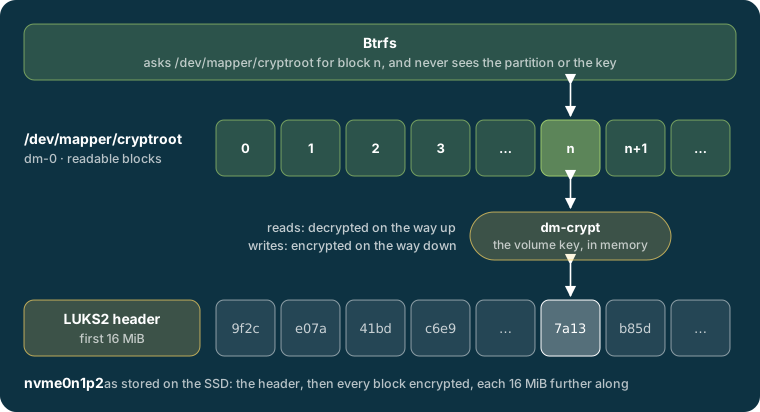
The kernel keeps a record of this. /sys/block lists every whole block device the kernel knows about, and there are only two:
ls /sys/block/
dm-0
nvme0n1
The SSD, and a device-mapper device. Its name, and what it is built on, are recorded beside it:
cat /sys/block/dm-0/dm/name
ls /sys/block/dm-0/slaves/
cryptroot
nvme0n1p2
dm-0 is cryptroot, and it sits on nvme0n1p2. This is where the tree lsblk draws comes from. The two are not the same size, and /sys gives each size in 512-byte sectors:
cat /sys/block/nvme0n1/nvme0n1p2/size /sys/block/dm-0/size
1951424512
1951391744
The decrypted device is 32,768 sectors smaller, exactly 16 MiB: the LUKS2 header, which stays outside it. Block 0 of cryptroot is the first block after the header, which is why the figure shows every block 16 MiB further along on the partition. The decrypted device is not a second disk: every read from it is a read from nvme0n1p2, decrypted on the way, and every write is encrypted on the way down. Section 1.9 creates and opens the container.
The filesystem #
A filesystem turns a block device into files and directories: it records what files exist, who owns them, and which blocks hold their contents. Btrfs is given /dev/mapper/cryptroot and treats it like any other disk; it has no idea the blocks underneath are encrypted.
Inside, Btrfs divides itself into subvolumes, each mounted where it belongs, as findmnt showed in section 1.1.
Note
Subvolumes are not partitions. A partition is a fixed range of the disk; a subvolume has no size and no place of its own, and all of them draw on the same space. df shows it, reporting the same filesystem, the same size and the same free space at every mount point (three of the five shown here):
Filesystem             Size  Used Avail Use% Mounted on
/dev/mapper/cryptroot  931G   24G  907G   3% /
/dev/mapper/cryptroot  931G   24G  907G   3% /home
/dev/mapper/cryptroot  931G   24G  907G   3% /var/log
A file added under /home takes space from / as well. Section 1.11 explains why the system is divided this way anyway.
What follows from the layers #
With the layers in mind, several choices in this chapter stop being rules to memorise:
- Why
/bootis the EFI system partition. The firmware reads FAT but not LUKS, and Limine, the boot loader, cannot open a LUKS container either. So the kernel and initramfs must be stored where both can reach them: on the ESP, unencrypted. - Why the passphrase is asked for by the initramfs. The first program that can open the container is the Linux kernel, with the tools the initramfs brings. Sections 1.18 and 1.19 build it.
- Why the boot line points at
/dev/mapper/cryptroot, not at the partition. The root filesystem lives on the decrypted device; the partition beneath it holds only ciphertext, which Btrfs could make nothing of.fstabnames the same filesystem by its UUID, as section 1.14 explains. - Why a snapshot of the system leaves out the kernel. A Btrfs snapshot covers a subvolume. The kernel and initramfs are on the ESP, in a different filesystem, so no snapshot of
@includes them. Chapter 14 deals with what that means for rolling back.
Further reading #
- Arch Wiki: EFI system partition, Partitioning, dm-crypt and Btrfs
- The kernel's documentation of the device mapper