Chapter 1 · 1.1
What we are building
This chapter takes a Framework Laptop 13 Pro with an empty SSD and leaves it running Arch Linux: encrypted, booting on its own, and stopping at a text login prompt. There is no desktop yet. Hyprland arrives in Chapter 4, and everything after that is built on what we lay down here.
Arch has an installer, archinstall, that would do all of this in a few minutes, and Chapter 15 uses it to test the finished system on a virtual machine. Here we do it by hand, one layer at a time, because every later chapter stands on these layers. When one of them breaks, knowing what each layer is and where it lives is how we find our way back.
Where we end up #
Here is the finished laptop's disk today, as lsblk describes it:
lsblk -o NAME,SIZE,TYPE,FSTYPE,MOUNTPOINTS /dev/nvme0n1
NAME            SIZE TYPE  FSTYPE      MOUNTPOINTS
nvme0n1       931.5G disk
├─nvme0n1p1       1G part  vfat        /boot
└─nvme0n1p2   930.5G part  crypto_LUKS
  └─cryptroot 930.5G crypt btrfs       /home
                                       /var/log
                                       /var/cache/pacman/pkg
                                       /.snapshots
                                       /
Read it from the top. The SSD, nvme0n1, has two partitions. The first is small, 1 GiB, formatted as FAT (vfat) and mounted at /boot: this is the EFI system partition, the one place the firmware can read, and it holds the boot loader, the kernel and the initramfs. The second takes the rest of the disk and holds a single LUKS2 container (crypto_LUKS). Opened, the container appears as cryptroot, and inside it is one Btrfs filesystem, mounted five times over.
Five mounts of one filesystem is not a mistake. Btrfs divides a filesystem into subvolumes, and each is mounted where it belongs. findmnt shows which is which, in the brackets after the device:
findmnt -t btrfs,vfat -o TARGET,SOURCE,FSTYPE
TARGET                  SOURCE                             FSTYPE
/                       /dev/mapper/cryptroot[/@]          btrfs
├─/home                 /dev/mapper/cryptroot[/@home]      btrfs
├─/.snapshots           /dev/mapper/cryptroot[/@snapshots] btrfs
├─/var/cache/pacman/pkg /dev/mapper/cryptroot[/@pkg]       btrfs
├─/var/log              /dev/mapper/cryptroot[/@var_log]   btrfs
└─/boot                 /dev/nvme0n1p1                     vfat
The system lives in @, our files in @home, and the logs, the package cache and the snapshots each have a subvolume of their own. The reason is snapshots: a snapshot of @ captures the system and nothing else, so rolling the system back does not roll back our files, or the logs that explain what went wrong. Section 1.11 goes through each subvolume, and Chapter 14 puts the snapshots to work.
How it boots #
Figure 1-1 shows what happens between the power button and the login prompt.
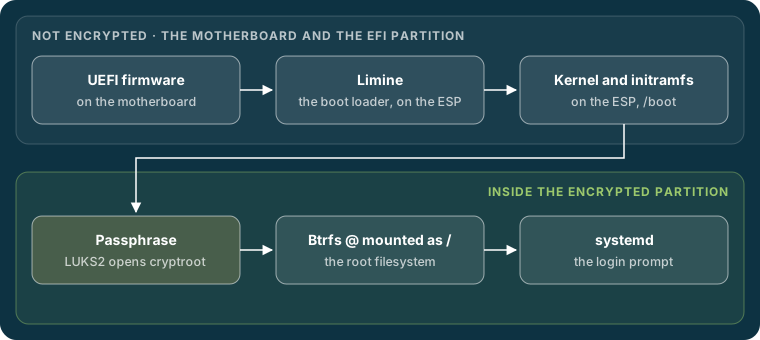
The firmware starts Limine from the EFI partition. Limine loads the kernel and the initramfs, a small temporary root filesystem, from the same partition. The initramfs asks for the passphrase, opens the LUKS2 container, mounts Btrfs subvolume @ as the root, and hands over to systemd, which starts everything else and finally the login prompt.
One line ties the boot chain to the storage. It is the kernel command line, which Limine passes to the kernel, and the running system shows it in /proc/cmdline:
cat /proc/cmdline
rd.luks.name=<LUKS-UUID>=cryptroot root=/dev/mapper/cryptroot rootflags=subvol=@ rw
rd.luks.name tells the initramfs which partition to open and what to call it; root and rootflags tell it what to mount as /. Each layer in this chapter exists to make that one line true.
| Layer | What it does | Set up in |
|---|---|---|
| UEFI firmware | Starts the first program from the EFI partition | 1.4 |
| GPT | Divides the SSD into two partitions | 1.8 |
| LUKS2 | Encrypts the second partition | 1.9 |
| Btrfs | The filesystem, divided into subvolumes | 1.10 to 1.12 |
| Arch Linux | The packages that make the system | 1.13 to 1.17 |
| initramfs | Opens the container and mounts the root at boot | 1.18 and 1.19 |
| Limine | Loads the kernel and initramfs | 1.20 and 1.21 |
The choices, and the usual alternatives #
Every layer is a choice, and most guides make some of them differently. Here is what this build uses and why.
| Layer | We use | Common alternative | Why |
|---|---|---|---|
| Firmware | UEFI | Legacy BIOS | The modern standard, and the only one Secure Boot works with |
| Partition table | GPT | MBR | What UEFI expects; MBR stops at 2 TiB and four primary partitions |
| Encryption | LUKS2 | None, or LUKS1 | Stronger key derivation; section 1.9 compares them |
| Filesystem | Btrfs, with subvolumes | ext4 | Snapshots and transparent compression (Zstandard) |
| Boot loader | Limine | GRUB, systemd-boot | One small configuration file, and boot entries for snapshots in Chapter 14 |
None of the alternatives is wrong. ext4 is simpler and has been dependable for longer than Btrfs; GRUB can do almost anything. These choices favour a system that can be rolled back after a bad update, and a configuration short enough to read in full.
What you need #
- The laptop. This build uses a Framework Laptop 13 Pro with an AMD Ryzen AI 7 350. Any x86-64 computer with UEFI firmware will do, with two differences to watch for: the disk may have another name (
sdarather thannvme0n1), and an Intel processor needsintel-ucodewhere section 1.13 installsamd-ucode. - A USB stick of at least 2 GB, for the Arch installation image.
- A second computer to write the image to the stick. Section 1.3 does it from a Mac.
- A Wi-Fi network, or a wired connection through a USB adapter, since the Framework has no network port. Section 1.6 connects to Wi-Fi from the installer.
- A passphrase you will remember. Section 1.9 says what makes a good one.
Warning
This chapter erases the laptop's SSD. Copy anything you want to keep onto another disk before section 1.8.
Dual-booting with Windows or another system is not covered: the whole SSD goes to Arch.